

Platform and firm guidance verified: August 18, 2026
Next review: August 23, 2026, or sooner after a pricing, connection, compatibility, copier, or firm-policy change
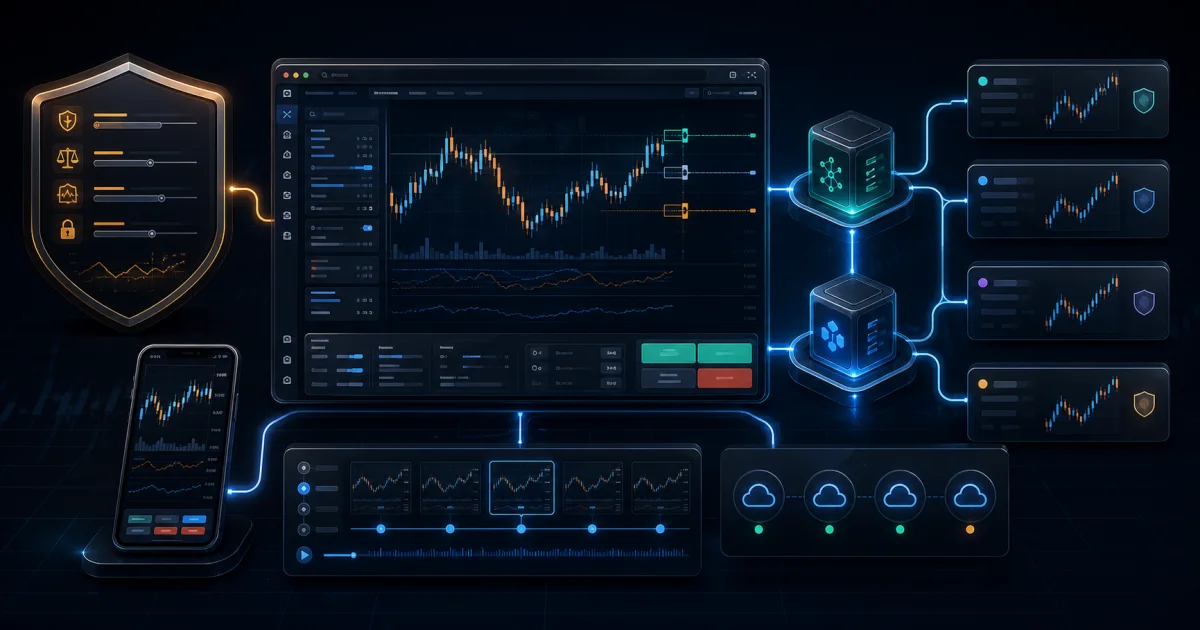
The practical answer: TradingThings.io is one of the more interesting new browser-based options for a prop-firm trader with a supported Rithmic account. The platform combines TradingView charts, direct chart trading, automatic position sizing, bracket and OCO workflows, cloud-based account copying, account-level risk controls, automated journaling, and a mobile interface. TradingThings currently says its trading platform is completely free, with premium features planned for the future.
For ComparePropFirms, the most useful real-world pairing is TradingThings.io with Bulenox. We are actively trading our own Bulenox accounts through the platform, and the connection has worked without issue in our use to date. That is a hands-on experience—not a guarantee that every account, gateway, order type, or future software version will behave the same way.
There is also one important cost qualification. Bulenox publishes a $100 monthly fee when a trader connects to Rithmic through a third-party API or “Trader Composite Software.” Bulenox does not name TradingThings on the reviewed fee page. Before treating the whole Bulenox setup as free, ask Bulenox whether your intended TradingThings connection falls within that charge. TradingThings may be free while the firm, broker connection, professional data status, or another service still carries a fee.
What is TradingThings.io?
TradingThings.io is a web-based futures trading platform built around TradingView charts and current support for Rithmic and dxFeed connections. Its public site presents the trading platform, account copier, journal, risk tools, and mobile experience as parts of one workflow rather than separate applications.
For a prop-firm trader, that integration matters. The daily workflow can otherwise become fragmented: chart in one program, route orders in another, watch several accounts in a copier, record trades in a spreadsheet, and rely on willpower to stop after reaching a loss limit. TradingThings is trying to put those jobs in one interface.
The platform currently says:
- Rithmic and dxFeed are supported for futures connections.
- The trading platform was completely free when verified on August 18, 2026.
- Premium features are planned for the future.
- Any prop-firm account that supports Rithmic is technically compatible from the platform's side.
- Tradovate and CQG support are planned, not currently available.
That last distinction is essential. Platform-side compatibility does not automatically equal firm permission. The prop firm still controls which third-party platforms, APIs, copiers, strategies, account stages, and fees are allowed.
Why Bulenox is the clearest prop-firm use case
Bulenox issues a Rithmic user ID and documents how traders connect through Rithmic Paper Trading. Its connection instructions require the trader to accept the Rithmic agreements and enable plugins before using a supported external platform. Additional Bulenox accounts are tied to the same Rithmic user ID, which makes the account structure a natural candidate for a multi-account interface.
Our hands-on result has been straightforward: the Bulenox credentials connect, the accounts appear, and we have been able to trade them through TradingThings without a connection problem in our testing so far. The clean browser interface is especially appealing if you want to avoid building your entire workflow around a Windows-only desktop installation.
Why we think the pairing deserves attention:
- Bulenox already uses Rithmic. TradingThings is not asking the trader to bridge an unrelated broker connection.
- Multiple accounts can be visible in one operating workflow. That is useful for traders managing more than one eligible Bulenox account under the firm's current rules.
- The interface is browser-based and mobile-aware. A trader can monitor accounts without keeping a full desktop platform open solely for the user interface.
- The chart, order, copier, risk, and journal tools are integrated. Fewer handoffs can make it easier to see which account, order, and limit is active.
- The platform itself is currently free. That lowers the cost of testing the interface before deciding whether it belongs in a permanent workflow.
Start with the Bulenox review to choose the right Bulenox account and risk model. Platform convenience cannot change Bulenox's drawdown, daily-loss, consistency, payout, scaling, prohibited-strategy, or account-stage rules.
The features that stand out
TradingView charts with direct order placement
TradingThings embeds TradingView charting and lets the trader analyze and place orders from the same visual workspace. The current help guide recommends a temporary hotkey method or the chart's right-click menu rather than leaving the older always-on chart-trading toggle enabled.
With the recommended hotkey workflow, the trader can hold the configured key and click the chart to stage a buy or sell order. The right-click menu can place simple or bracket orders and can add a stop loss or take profit to an open position. This reduces movement between a chart and a separate order ticket, but it also makes deliberate input discipline important.
Automatic position sizing and Draft Mode
Automatic position sizing is one of the platform's strongest practical features. A trader specifies a dollar risk and stop distance, and TradingThings calculates the corresponding contract quantity. The May 2026 Draft Mode update extended that workflow across market, limit, and stop orders on desktop and mobile.
Draft Mode lets the trader position the proposed entry, stop, and target before submitting the order. That can make risk visible before execution instead of forcing a contract calculation during a fast market.
It is still only a platform calculation. Confirm the contract multiplier, tick value, maximum size, open positions, and firm limits before submitting. A correctly calculated dollar risk can still violate a Bulenox contract or drawdown rule.
OCO, brackets, breakeven, trailing, and auto-close tools
TradingThings currently lists OCO orders, bracket orders, automatic breakeven, automatic trailing, and automatic close among its order-management tools. These features can reduce manual clicks after entry and help make the intended exit structure visible.
Before relying on automation, test each behavior at the smallest permitted size. Confirm what happens when the browser closes, the connection drops, a follower account rejects an order, or the firm liquidates an account. “Bracket,” “flatten,” and “cancel all” can describe different scopes across platforms and account groups.
Chart one contract and execute another
The cross-trading feature separates the chart symbol from the execution symbol. A trader can analyze NQ while routing the order to MNQ, for example. That can be useful for traders who prefer the liquidity and visual structure of a full-size contract chart while using micros for more precise position sizing.
The feature increases the importance of a pre-entry symbol check. Confirm both the chart and execution contract, including the month and year, before submitting an order. Use the futures rollover checklist when volume migrates to a new contract.
Cloud-based trade copying with visible status
TradingThings says its copier can connect unlimited accounts and connections, assign follower quantity multipliers, copy normal and bracket orders, modify or cancel orders, flatten positions, and show each follower as filled, pending, delayed, or failed. It also publishes automatic discrepancy warnings when master and follower positions or orders do not match.
The copier runs in the cloud and can be managed separately from the main charting interface, including from mobile. TradingThings says a trader can execute from another platform while using its copier.
Those are valuable operational features, but copier permission is controlled by each firm and account stage. Copy only accounts you own and control, avoid prohibited third-party trading or opposite-direction exposure, and verify every follower after a reset, payout, rule change, disconnection, or new trading day. Read the prop-firm copy-trading rules guide before grouping accounts.
Built-in risk controls and lockouts
TradingThings publishes account-specific daily loss limits and profit targets with actions that can block trading, liquidate positions, or do both. It also offers timed manual lockouts and a settings-lock threshold designed to stop a trader from moving limits when P&L approaches the chosen boundary.
These controls can be useful behavioral guardrails. They do not replace the firm's actual risk engine. Set platform limits inside the Bulenox maximums, understand whether unrealized P&L is included, and test the precise action taken at the threshold. If the firm and platform calculate P&L or session boundaries differently, the stricter boundary should govern the plan.
Automated journal, replay clips, and custom dashboards
TradingThings automatically captures connected trades into a journal without a CSV import. Current features include a monthly P&L calendar, custom fields, filters, a Notion-style notes editor, custom dashboards, and more than 25 dashboard components.
Its automatic video clips preserve the chart state, drawings, and indicators around a trade for replay. That can make post-session review more useful than a list of fills because it preserves the context in which the decision was made.
A mobile interface built for touch
The platform can be installed from the browser as a mobile web app on iOS and Android. TradingThings describes a purpose-built mobile interface with order management, copier access, journaling, push notifications, and drag controls for stop-loss and take-profit placement.
Mobile access is best treated as a controlled backup and monitoring surface until the trader has tested it. Small screens, cellular transitions, and touch inputs add different error modes. Confirm the account, contract, quantity, entry, stop, target, and connection state on every mobile order.
Is TradingThings.io really free?
The current first-party answer is yes for the trading platform. TradingThings' live FAQ says the platform is completely free and that premium features will be introduced later. Its current call to action says no credit card is required. The copier page is slightly narrower, describing the copier as “free to get started.”
That wording supports a precise conclusion:
- The core TradingThings trading platform is currently advertised as free.
- Do not assume every present or future premium feature will remain free.
- A Rithmic account, prop-firm account, professional market-data status, optional data, or firm-side third-party connection fee can still cost money.
- Recheck pricing immediately before publication and before readers build a permanent workflow around the current offer.
For Bulenox specifically, the free-platform claim must be shown beside Bulenox's published third-party connection language. Ask Bulenox support whether TradingThings is classified as a third-party API or Trader Composite Software for your account and stage, and save the response.
Rithmic versus dxFeed on TradingThings
TradingThings' current public FAQ lists both Rithmic and dxFeed as supported futures connections. For prop-firm traders, Rithmic is the more clearly documented path because TradingThings expressly says Rithmic prop-firm accounts are compatible, and Bulenox supplies Rithmic credentials.
The presence of dxFeed support should not be read as proof that a particular prop firm allows dxFeed execution or that the same features work identically across both connections. Verify which connection supplies market data, which connection routes orders, what credentials are required, and whether the selected firm authorizes that workflow.
A careful Bulenox setup checklist
- Confirm the Bulenox account is active and review its exact rule set and account stage.
- Log into R Trader Pro first, accept the Rithmic agreements, and confirm that plugins are enabled as Bulenox instructs.
- Ask Bulenox whether TradingThings triggers the published $100 monthly third-party API/composite-software charge for your account.
- Create or sign into TradingThings, select Rithmic, and choose the correct Rithmic system and gateway.
- Connect one account before adding followers.
- Confirm balance, account number, permitted contracts, market data, and the active contract month.
- Place, modify, and cancel a minimum-size test order in a permitted environment.
- Test bracket, OCO, flatten, lockout, and reconnection behavior.
- Add follower accounts one at a time and verify copied quantities and order states.
- Save screenshots and logs if an order, position, or account state differs between TradingThings and Rithmic.
If the connection or order state behaves unexpectedly, stop opening new positions and follow the platform outage evidence checklist.
Who should consider it?
TradingThings is especially compelling for a trader who:
- uses an eligible Bulenox or other permitted Rithmic account;
- prefers TradingView charts but wants direct futures order placement;
- wants a browser-first and mobile-capable workflow;
- manages several trader-owned accounts and values detailed copier status;
- wants risk locks and automatic position sizing inside the trading interface;
- wants automated journaling and visual replay without CSV imports; or
- wants to test a modern platform without paying a separate platform subscription, based on pricing verified August 18, 2026.
It may not be the right fit if your firm prohibits the connection, your workflow requires Tradovate or CQG before their support is added, you need an unsupported custom tool, or you are unwilling to verify how cloud copying and platform-side risk actions interact with firm rules.
The bottom line
TradingThings.io brings together many of the tools prop-firm traders normally assemble separately: TradingView charts, Rithmic and dxFeed support, fast chart orders, automatic position sizing, brackets, cloud copying, account-specific risk controls, mobile access, and an automated journal. The current free price makes it easy to test, and our own Bulenox experience has been smooth so far.
The responsible recommendation is still conditional: use TradingThings only with a firm and account stage that allow it, and verify every potential firm-side charge. For our audience, Bulenox is the strongest starting point because its Rithmic account structure works with the platform in our hands-on use and gives readers a practical firm path to evaluate.
Review the Bulenox account options, open the current offer through ComparePropFirms, and confirm the final firm rules, coupon, third-party connection fee, and platform status before paying or placing a trade.
Current Firm Offers and Direct Links
Open the firm in a new tab with the recorded ComparePropFirms commercial link. Use the displayed code when applicable, and confirm the final price and terms before paying.
Official sources and verification
- TradingThings.io homepage — checked August 18, 2026; supported Rithmic and dxFeed connections, current free-platform FAQ, TradingView charts, direct Rithmic connection, position sizing, order strategies, copier, journal, mobile, and risk-control features.
- TradingThings trade copier — checked August 18, 2026; cloud architecture, order support, real-time follower status, discrepancy detection, account/connection limits, mobile access, and “free to get started” wording.
- TradingThings Rithmic connection guide — checked August 18, 2026; Rithmic sign-in path and explicit Bulenox and Rithmic prop-firm compatibility claim.
- TradingThings chart-trading guide — checked August 18, 2026; recommended hotkey and right-click workflows, bracket support, automatic position sizing, and deprecated always-on toggle warning.
- TradingThings Draft Mode changelog — checked August 18, 2026; market, limit, and stop-order drafting plus desktop/mobile automatic sizing.
- TradingThings privacy policy and terms — checked August 18, 2026; connected trade-data handling, service-change authority, and subscription framework.
- Bulenox connection guide — checked August 18, 2026; Rithmic credentials, Rithmic Paper Trading, gateways, agreements, plugin setting, data status, and supported-platform context.
- Bulenox Qualification Account rules — checked August 18, 2026; published $100 monthly third-party API/Trader Composite Software language and external-provider responsibility boundary.